Choosing a team collaboration tool sounds like an easy decision, right? Just pick one, create accounts, and start chatting. But when a business actually starts using it every day, things become a little different.
Messages, files, meetings, integrations, old conversations, and those “where did we discuss this?” moments start becoming important. That is when companies start looking closely at platforms and searching for the real Teams Vs Slack difference.
Both platforms are powerful, both have loyal users, and honestly, both can get the job done. But the way they help teams communicate and manage work is where things start changing.
So, let’s look at Microsoft Teams vs Slack, what makes them different, and which platform can actually help teams move faster.
Slack and Microsoft Teams: A Quick Overview
Before jumping into a detailed Slack vs Teams comparison, it is important to understand what both platforms are built for.
What is Slack?
Slack is a workplace communication platform that focuses on making conversations simpler and more organized. Instead of endless email chains, teams can create channels for projects, departments, clients, or any topic they need.
The idea is pretty simple. Keep conversations in one place, connect the tools you already use, and make it easier for people to find information when they need it.
Slack is known for its clean interface, easy adoption, and strong app ecosystem. Many G2 users appreciate that teams can start using it quickly without a long learning process.
What is Microsoft Teams?
Microsoft Teams is a collaboration platform from Microsoft that combines chat, meetings, file sharing, and Microsoft 365 applications.
For businesses already using tools like Outlook, Word, Excel, SharePoint, and OneDrive, Teams feels like a natural extension because everything stays connected in one ecosystem.
In a Microsoft Teams vs Slack discussion, Teams often becomes a preferred choice for organizations already invested heavily in Microsoft products.
Slack vs Microsoft Teams Comparison: Features, Pricing, and User Experience
The Slack vs Teams comparison is not really about finding a winner. It is more about understanding which platform matches your team’s daily workflow.
A small startup, a growing business, and a large enterprise might look at the same tools and choose differently. Therefore, the “best” option depends on what your team actually needs.
| Feature | Slack | Microsoft Teams |
|---|---|---|
| Communication Style | Channel-based communication with threads, direct messages, and quick discussions | Chat, channels, meetings, and collaboration spaces |
| Meetings | Audio and video calls through huddles and integrations | Advanced meetings with Microsoft ecosystem support |
| Integrations | Large app marketplace with thousands of integrations | Deep connection with Microsoft 365 tools |
| File Sharing | Easy sharing inside conversations with searchable history | Strong file management through OneDrive and SharePoint |
| Search Capability | Search messages, files, and connected apps easily | Search across Teams and Microsoft services |
| User Experience | Simple interface focused on communication | Feature-rich workspace with multiple capabilities |
| Custom Workflows | Flexible automation with apps and integrations | Automation through Microsoft tools and Power Platform |
When it comes to pricing, Slack provides Free, Pro, Business+, and Enterprise plans. Microsoft Teams pricing depends on standalone plans and Microsoft 365 subscriptions.
For businesses comparing MS Teams vs Slack, the cost is only one factor. The bigger question is whether the platform supports the way employees actually work.
What Customers Say About Slack and Microsoft Teams
Customer opinions usually depend on their existing environment and what they expect from a collaboration platform.
Slack users often mention that conversations feel faster and less complicated. Teams can create channels, connect different applications, and keep discussions organized without making employees search through multiple places.
Microsoft Teams users usually appreciate the connection with Microsoft 365. For companies already working with Microsoft applications, having meetings, files, and communication together feels convenient.
Many users on review platforms like G2 highlight Slack’s simplicity and Teams’ ecosystem advantage. So, the decision is not always about features, it is about which experience feels more natural for the team.
As the famous Spider-Man quote from Spider-Man: No Way Home says, “With great power comes great responsibility.” A platform can have hundreds of features, but if people struggle to use it, those features do not help much.
How Is Slack Different From Teams?
The biggest difference between Slack and Teams comes from their approach toward workplace communication.
Slack mainly focuses on making conversations quick, flexible, and connected. It feels like a communication hub where teams can bring different tools together and keep work moving.
Teams, on the other hand, focuses on combining communication with Microsoft’s productivity ecosystem. It works especially well for organizations already managing their work through Microsoft applications.
The Slack Microsoft Teams comparison becomes interesting because both platforms solve similar problems but from different directions.
Slack feels more like a place where conversations happen naturally.
Teams feels more like a complete workplace environment where communication and productivity tools stay together.
Is Slack Better Than Teams?
The answer depends on the business, but Slack can be a better choice for teams that want:
- Faster communication between teams
- A simpler user experience
- More flexibility with third-party integrations
- Easier connection with different business tools
- A communication-first workspace
For companies searching for the real Teams Vs Slack difference, Slack often stands out when flexibility and quick collaboration are the main priorities.
However, organizations that depend heavily on Microsoft 365 may still find Teams more suitable because of its native connections.
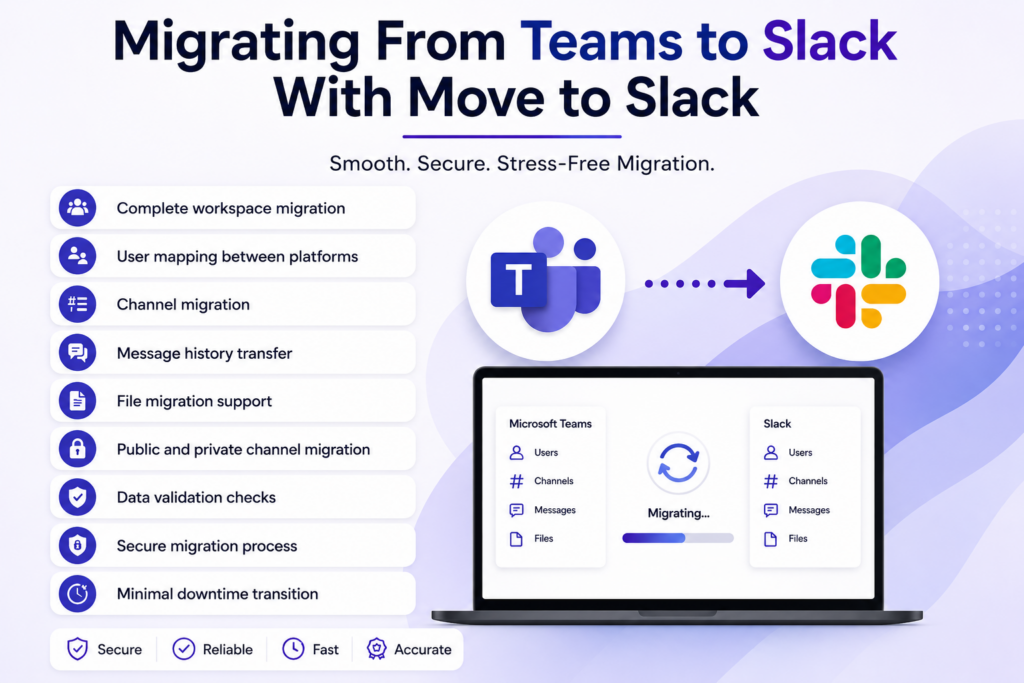
Migrating From Teams to Slack With Move to Slack
Changing collaboration platforms is not just about creating new accounts. Businesses have years of conversations, channels, files, and important information stored inside their workspace.
Moving everything manually can become stressful very quickly. One missing message, one incorrect user mapping, and suddenly the migration becomes a bigger problem than expected.
Move to Slack helps businesses smoothly migrate their workspace data from Teams to Slack while keeping important information protected.
Key capabilities include:
- Complete workspace migration
- User mapping between platforms
- Channel migration
- Message history transfer
- File migration support
- Public and private channel migration
- Data validation checks
- Secure migration process
- Minimal downtime transition
With Move to Slack, businesses can move their collaboration environment without losing valuable conversations and historical information.
The Microsoft Teams vs Slack migration process becomes much easier when the technical complexity is handled through a reliable migration solution.
Conclusion
Both Slack and Microsoft Teams are strong collaboration platforms, but the right choice depends on how your team communicates and manages daily work.
A proper Teams Vs Slack evaluation helps businesses understand what they actually need instead of simply choosing the most popular tool.
Whether you decide to stay with Teams or move to Slack, the important thing is creating a workspace where teams can communicate better, find information faster, and keep work moving.
Frequently Asked Questions
Slack helps reduce communication delays through organized channels, powerful search, and flexible workflows. During migration, Move to Slack preserves historical data, allowing teams to stay productive from day one.
A properly planned migration can preserve messages, channels, files, and user mappings. Move to Slack follows secure migration practices to help organizations retain valuable collaboration history and business continuity.
Migration time depends on workspace size, users, files, and message volume. Move to Slack streamlines the entire migration process with efficient planning, validation, and secure data transfer practices.
Organizations should review users, channels, permissions, files, and migration goals beforehand. Move to Slack supports structured migration planning, reducing risks and ensuring a smoother collaboration platform transition.
Careful planning, validation, and staged migration significantly reduce business interruptions. Move to Slack follows proven migration methodologies that help organizations transition efficiently while keeping teams connected throughout the process.