The way teams communicate has changed a lot in the last few years. Earlier, a quick update meant sending an email, waiting for replies, and then searching through a hundred different threads later when someone actually needed that information.
But as businesses grow, communication starts becoming a different kind of challenge. More people join, more projects start running together, and suddenly finding one important message feels like finding a small note hidden inside a huge notebook.
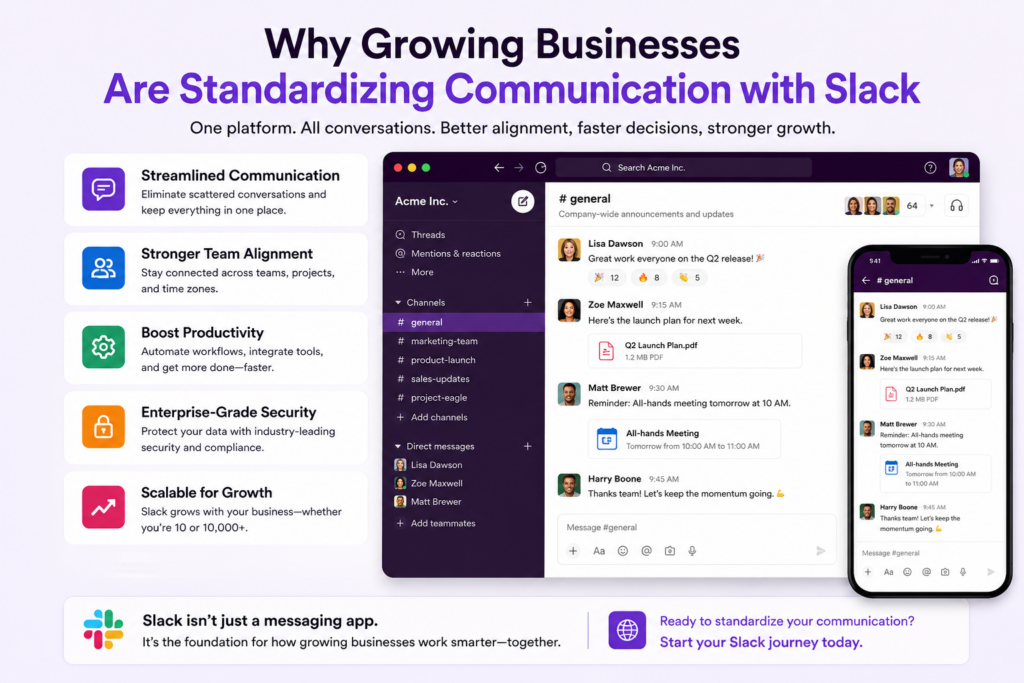
This is where Slack for Business is becoming an important choice for growing companies that want conversations, files, decisions, and daily collaboration in one connected place. Instead of communication being spread everywhere, teams can create a more organized workspace where everyone knows where things are happening.
Why SMBs Are Moving Toward More Connected Communication
Communication is no longer only about sending messages. Modern teams need a place where discussions connect with projects, tools, customer updates, and everyday work.
The Shift From Traditional Messaging to Workplace Collaboration
Email and basic messaging still have their place, but they are not always built for fast-moving teams. When different departments work together, important information can easily get buried between replies, attachments, and separate conversations.
A modern team communication software gives employees a shared space where conversations are easier to follow and information stays available when people need it.
For growing companies, this change is less about replacing old habits overnight and more about making daily work a little less messy.
Keeping Teams Connected Across Different Locations
Remote and hybrid work have changed how teams collaborate. People are no longer sitting in the same room asking quick questions or sharing updates directly.
With Slack for teams, employees can create dedicated spaces for departments, projects, customers, or specific discussions. This makes it easier for everyone to jump into the right conversation without searching through endless messages.
The small benefit here is actually a big one, people spend less time looking for information and more time using it.
Bringing AI Into Everyday Team Conversations
Artificial intelligence is also changing how businesses use collaboration platforms. Instead of communication tools only storing messages, they are becoming smarter assistants that help teams find information faster.
Slack has introduced AI capabilities that help users summarize conversations, search workplace knowledge, and get answers from existing discussions. This shift shows how communication platforms are moving from simple messaging apps toward intelligent workplace systems.
For businesses, this means old conversations are no longer just history sitting somewhere. They can become useful knowledge when teams need quick answers.
Creating One Place for Work, Not Multiple Scattered Tools
As companies grow, they usually add more applications for sales, customer support, marketing, and operations. The problem is that every new tool can create another place where information gets stuck.
A connected communication platform helps bring discussions closer to the tools employees already use.
For example, teams can connect project updates, customer conversations, alerts, and workflow notifications inside Slack instead of constantly switching between different platforms.
This is one reason many organizations consider Slack for Business when they want communication to become part of their daily workflow instead of another separate activity.
Making Team Knowledge Easier to Find
One common challenge in growing companies is that valuable information is often hidden inside old conversations.
Someone may have solved a customer issue months ago, shared a useful process, or explained a technical problem, but finding that message later can take forever.
Slack migration process helps organizations move their existing communication history into a more organized environment while keeping important discussions accessible.
The goal is not only moving messages from one place to another. It is about keeping company knowledge available instead of letting it disappear.
Supporting Faster Collaboration Between Departments
Sales, marketing, customer support, and operations rarely work separately anymore. A customer update from one team can affect decisions across the entire business.
Using Slack for teams allows departments to create shared spaces where updates happen faster and everyone stays aware of important changes.
This reduces unnecessary meetings and those “quick questions” that somehow turn into long email chains.
Moving to Slack with Move to Slack
Changing communication platforms sounds simple until businesses think about everything stored inside them, conversations, files, channels, and years of team knowledge.
Move to Slack helps businesses make this transition easier by moving important Slack data while keeping valuable communication history available. Instead of starting from zero, teams can continue working with the information they already built.
With a proper Slack migration, businesses can bring their existing workspace data into a new environment while reducing disruption for employees.
Key capabilities:
- Move conversations and channel history without losing important discussions.
- Transfer files and shared information needed by teams.
- Maintain organized communication during the migration process.
- Reduce manual effort involved in moving workplace data.
- Help teams continue collaboration with less downtime.
- Support smoother adoption of the new workspace.
The Future of Business Communication Is More Connected
Growing businesses need communication systems that can keep up with changing teams, increasing customers, and faster decision-making.
Slack for Business is becoming more than a messaging platform because companies now need collaboration, knowledge sharing, and workflows connected in one place.
As organizations continue adopting smarter workplace tools, the focus will move from simply communicating faster to working together better.
For companies planning a Microsoft Teams to Slack migration or improving their existing communication setup, the biggest goal remains the same, making work easier for people who are actually doing it every day.
That is where Move to Slack helps. It makes the transition easier by moving important chats, files, and channel history so teams can continue their work without losing the information they have built over time. That is where the real value of modern collaboration starts.
Frequently Asked Questions
Migration time depends on workspace size, users, files, and message history. Using Move to Slack helps automate transfers, reducing manual work while keeping migration timelines predictable and business disruption minimal.
Yes. Slack scales with growing teams through channels, integrations, and automation. During expansion, Move to Slack helps migrate historical conversations smoothly while minimizing interruptions to everyday business collaboration and productivity.
Slack enables departments to collaborate through dedicated channels and shared workspaces. Move to Slack preserves department conversations during migration, helping teams continue collaborating without losing valuable business communication history.
Keeping historical conversations supports compliance, onboarding, and future knowledge sharing. Move to Slack helps organizations securely transfer valuable communication records, ensuring important business information remains searchable after migration completes successfully.
Organizations should review users, permissions, channels, integrations, and migration priorities beforehand. Move to Slack supports structured planning, helping businesses complete workspace migrations efficiently while reducing avoidable operational challenges and delays.